Book a demo

Use cases

The same agent, in every team.

Mnemio isn't built for one industry. Each person hands their agent the work they repeat every week, whether that's a sales report, a client portal or a cost model.

Founders and COOs

See what needs you, and what it saved.

You get the short version every morning, and the numbers to decide whether to roll out further.

A briefing every morning

A short note on what needs you today, tied to your goals, wherever you already are.

Slack, WhatsApp, Discord, email or the web
Tied to the goals you set

Answers without chasing

Ask what's happening with a client or a deal. Your agent answers from your apps and from what the team has shared with you.

From the company brain, under your rules
Or it asks a colleague's agent, and they approve the reply

The hours saved, person by person

Each finished task counts set minutes for its type of work, and employees confirm or correct them.

By person, team and type of work
Export it, and decide with numbers

Know-how that stays

What people share stays with the company when they leave, and so do the skills they shared.

Key processes saved as shared skills
Admins review what's shared

Sales and client teams

More proposals out the door. Fewer chases.

Your best people spend the week on status updates, reports and follow-ups. Their agents prepare that work from your CRM, inbox and ad accounts.

Proposals from call notes

Drop in the notes from a call. The agent pulls the brief, similar past work and the current rate card, then drafts the proposal for you to edit.

Google Drive, Notion, Gmail
Asks a colleague's agent when it needs something, and they approve the reply

Reports on a schedule

Every week it pulls pipeline and campaign numbers, writes the summary the way you asked for it once, and posts it where the team will read it.

HubSpot, Salesforce, Google Ads, Meta Ads
Runs as a scheduled task

Follow-ups that don't slip

Your daily briefing shows who has gone quiet, and the agent drafts the next email from what it knows about each client. Its rules make it ask before sending.

Gmail, Outlook, HubSpot, Salesforce
Approve from Slack or WhatsApp

What works, shared with the team

Client facts, decisions and lessons learned can reach the rest of the team through your sharing rules, so new hires don't start from zero.

Shared with the sales group or the company
Admins review it

Operations

Every portal checked. Nothing left to memory.

Rates live in spreadsheets, status lives in a dozen portals, and the details live in people's heads. Their agents do the checking and chasing.

Portals watched on a schedule

On a schedule, it checks client, supplier and carrier portals for each open order, updates your tracker and tells you what's running late.

Works through portals in its own browser
Runs as a scheduled task

Quotes from your rate sheets

A request arrives by email. The agent prices it from your current rate sheets and margins, drafts the quote and asks before sending.

Gmail, Outlook, Excel, Google Sheets
Approve from WhatsApp or Slack

Documents checked before they cause trouble

Invoices, packing lists and contracts checked against the order, with every mismatch listed for a person to review.

Reads PDFs and spreadsheets
A list of mismatches, each with the reason

Purchase orders chased

It tracks what's unacknowledged or late and drafts the chaser for your OK, so nobody has to keep the list in their head.

Its rules make it ask before it emails
Runs daily or weekly

Finance and admin

Close the month without the copy-paste.

Invoices arrive by email and WhatsApp, and the numbers live in spreadsheets and your accounting system. Their agents do the matching and chasing.

Invoices matched to POs

It collects invoices from email, WhatsApp and supplier portals, checks them against your purchase orders and goods received, and lists every exception with the reason.

Gmail, Outlook, WhatsApp, Excel, Google Sheets
Supplier portals through its browser, after you sign in

Payment runs you approve

It prepares the run from what matched and holds the exceptions. Its rules make it ask, and you decide in the app, Slack or WhatsApp.

Sent to you wherever you are
Every approval is logged

Reconciliations you can check

It compares statements with the ledger, clears what matches and lists what doesn't, with workings in a spreadsheet.

QuickBooks, Xero, Zoho Books, statements as CSV or PDF
Runs its checks as a script, so they repeat exactly

Month-end that runs the same way

Save your close as a skill. It runs the same steps each month and shows you what's left, whoever starts it.

Shared with your finance group
Hours saved show up on your dashboard

Across the company

A Monday with Mnemio.

An example of how the same day could look across four teams.

  1. 9:00 am: the briefingOn WhatsApp, the founder sees what's due, which deal has gone quiet and what's waiting for approval.
  2. 9:00 am: the pipeline reportIt's already in Slack: one row per rep, the way John asked for it once.
  3. 11:00 am: a cost modelJohn needs the Q4 cost model for a proposal. John's agent asks Priya's agent, it finds the file, and Priya approves with one tap.
  4. 2:00 pm: the portal roundClient portals checked for every open order, the tracker updated, two delays flagged.
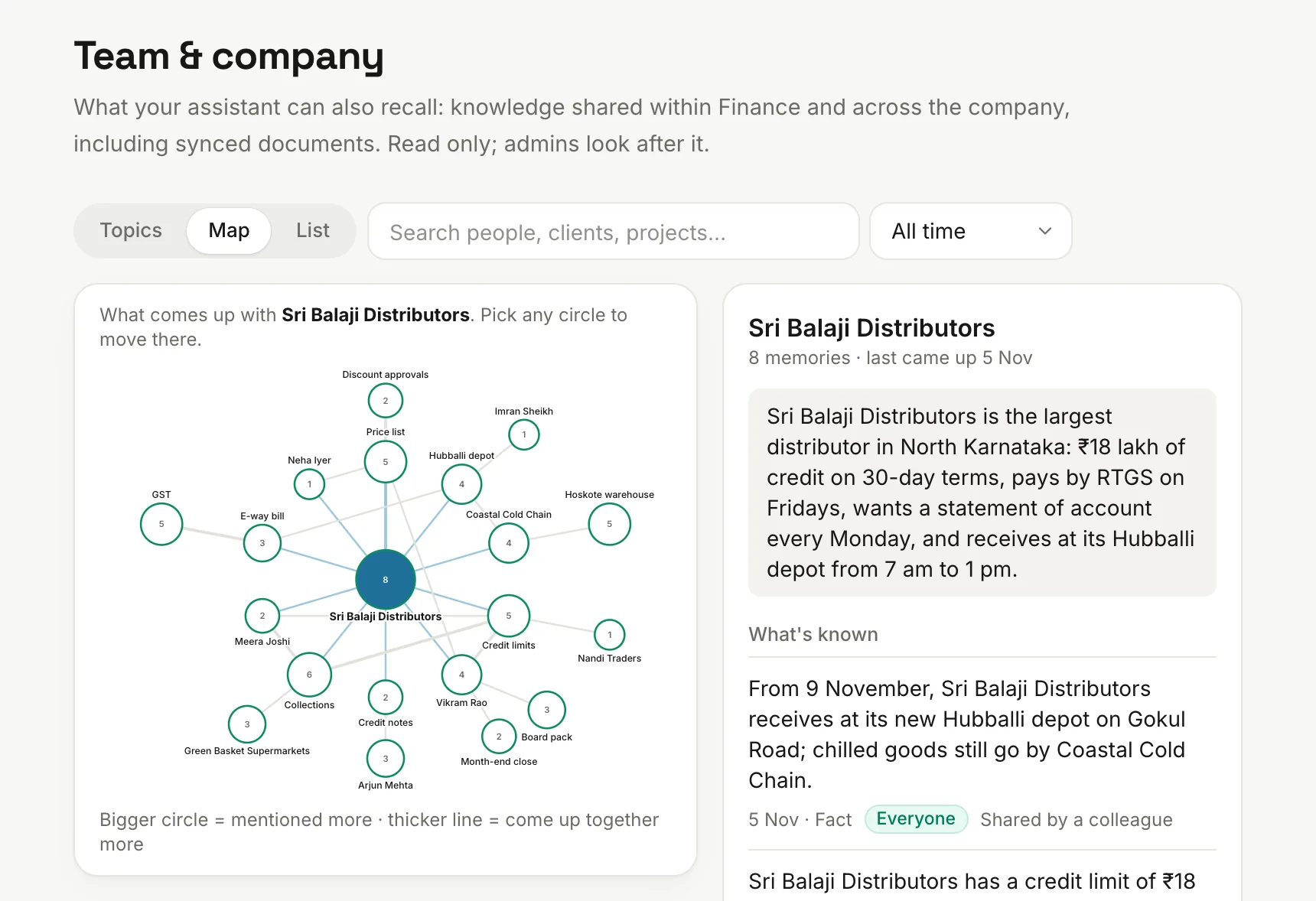
  5. 5:00 pm: what the team learnedA client wants invoices on the 1st. Under your rules that reaches the company brain, so John's agent knows it too, and so will the next hire's.
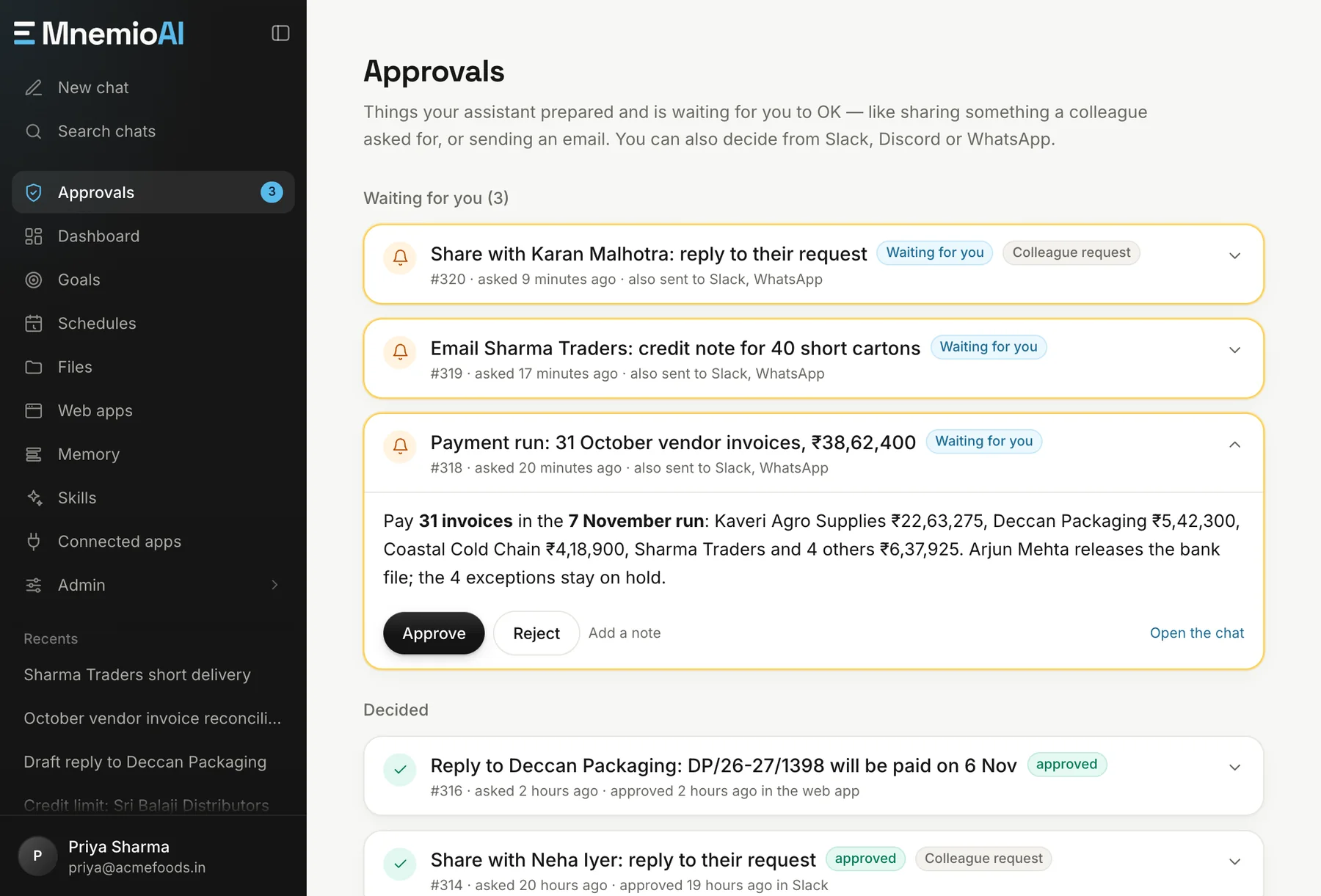
The Approvals page, with a colleague's request, an email to a supplier and a payment run waiting for a decision.
The Team and company memory page, with a map of what's known about a customer and who shared each fact.

Connections

Works with the tools you already have.

  • Google Workspace
  • Zoho
  • Microsoft 365
  • Slack
  • WhatsApp
  • HubSpot
  • Salesforce
  • QuickBooks
  • Xero
  • Google Ads
  • Meta Ads
  • Notion
  • Web portals
  • 1,500+ more

Each person connects their own accounts, and your admin decides which groups can use which apps. Portals with no connection work through the agent's browser, after you sign in.

Questions

What teams ask us.

Is it built for our industry?

It isn't built for one industry, and there's no custom code per industry. The same agent takes on a sales report, a client portal or a cost model. Our guides by industry show what that can look like in yours.

Will it send emails to my clients on its own?

Its rules make it ask first. It drafts the email and you approve it in the app, Slack, Discord or WhatsApp. Every approval is logged.

Can it post entries or pay on its own?

Its rules make it ask first. It prepares the payment run or the entries, you approve in the app, Slack, Discord or WhatsApp, and every approval is logged.

Our suppliers and clients don't have APIs. Does that matter?

No. The agent has its own browser and can work through portals much like a person does. You sign in yourself when a portal asks, including one-time codes.

Can it work with systems on our office network?

Cloud systems connect through an app connection, MCP or the browser. Agents can't reach systems that sit only on your office network, so talk to us about those. Tally runs on your own computers, so agents work from its exports and prepare entries for you to import.

Does what one person learns reach the others?

Under the sharing rules your admins write, yes. Client facts, decisions and lessons learned can be shared with a group or the whole company, without personal detail. Admins can review it, change who can recall it, or remove it.

How does it learn the way we do things?

You correct it in plain words and it remembers. When a process works, save it as a skill, so it runs the same way next time, whoever starts it.

Want more detail?Step-by-step guides to what agents can do in your industry.

Bring your hardest workflow.

Thirty minutes. Bring the task that eats the most hours in your team, and we'll show you how an agent would run it.